Case and study management
Create clinical cases, upload multiple USDZ studies, and follow sanitisation, conversion, progress, readiness, failure, and retry status.

Lumexa Reporting Platform · Second Opinion Workflow
Connect doctors with specialist expertise through secure case sharing, interactive study review, and documented second opinions. Keep clinical information and finalized consultation reports together so teams can review findings in the context of each case.
Workflow overview
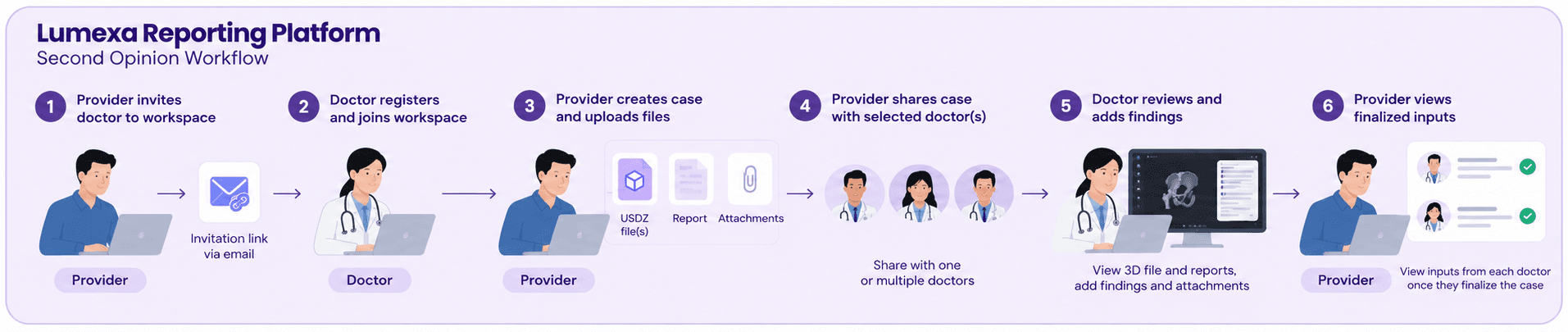
Lumexa Reporting Platform is a standalone clinical collaboration and second-opinion solution that connects doctors and specialists across geographical boundaries, enabling seamless remote consultations and expert clinical reviews from anywhere in the world. At its core is a built-in viewer with an integrated reports panel, allowing doctors to visualize patient-specific images, review clinical information, and share independent findings without relying on PACS systems, external viewers, or multiple applications. The platform simplifies secure case sharing and enables multiple specialists to provide independent opinions, bringing all finalized findings into one centralized workspace. Lumexa makes expert second opinions more accessible, streamlines clinical workflows, and supports informed clinical decision-making.
Platform workflow
Benefits
Lumexa provides one central environment for managing 3D clinical studies and coordinating specialist consultations—from study upload and controlled sharing to browser-based review and documented reporting.
Create clinical cases, upload multiple USDZ studies, and follow sanitisation, conversion, progress, readiness, failure, and retry status.
Review processed studies in a full-screen browser viewer and switch model components between opaque, translucent, and hidden states.
Share ready cases with selected doctors and ensure each doctor can access only the cases explicitly shared within their workspace.
Make each ready case available only to the consulting doctors selected by the provider.
Apply workspace membership and role checks before cases, studies, reports, or administration tools are shown.